This is written for the person who pays outside haulers by the ton and gets an invoice with scale tickets (weight tickets, mill tickets) attached. It is a real question with no standard answer. In 2023 a heavy highway contractor asked a construction finance forum whether there is "a reconciliation process to the invoice when it comes in" for stone tickets, and the thread shows no replies. Where accounting software does have a screen for it, the work is still done by hand: one construction system has you select tickets until the total freight charge accumulates to the amount on the hauler's invoice.
What you need in front of you
- The hauler's invoice.
- The delivered ticket: the one from the scale where the load was dumped.
- The supplier's ticket, if the load was also weighed where it was loaded.
- The agreed rate for the lane (one pickup to one delivery), from a rate sheet, a rate confirmation or last month's invoices.
- Your contract or purchase terms, for one fact: which scale's weight you pay on.
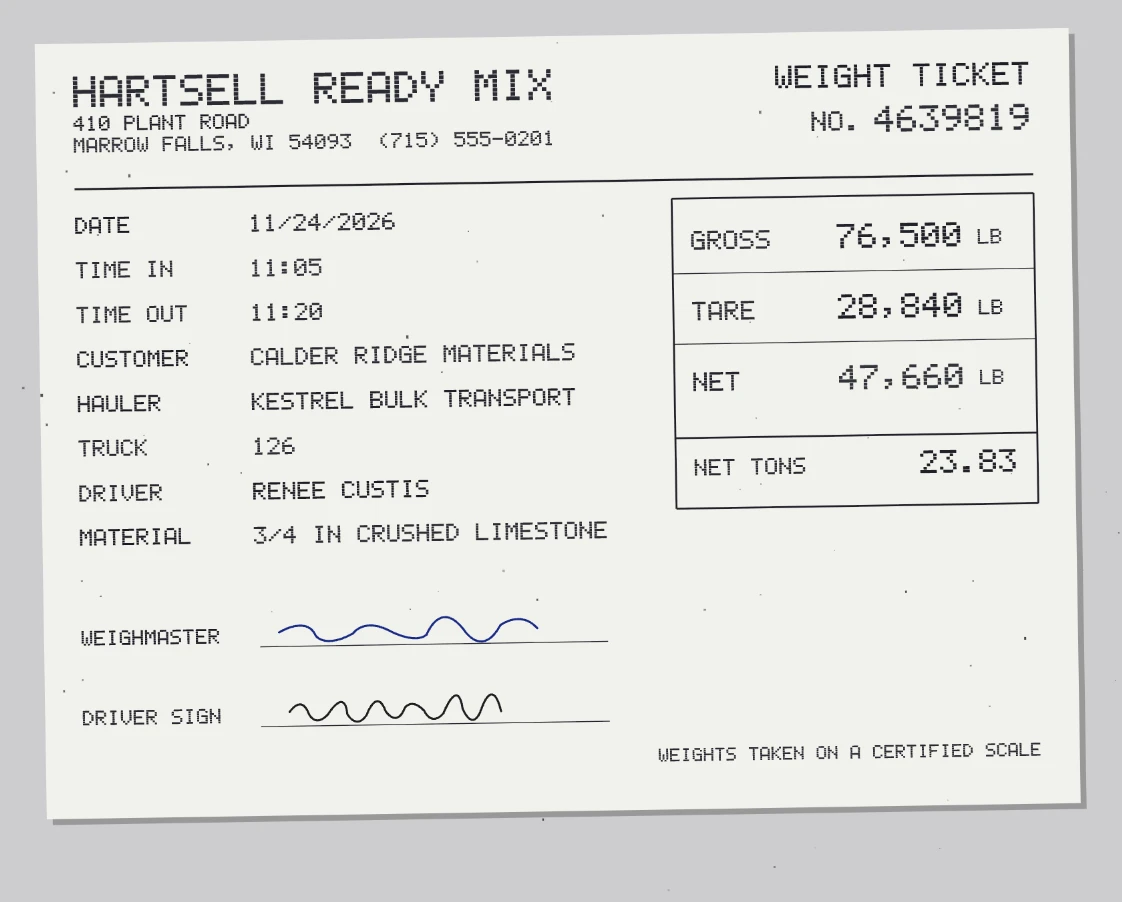
The seven comparisons, in order
The order matters. Each step assumes the one before it passed, so a failure early on saves you the later steps.
- Ticket number against the invoice reference. The invoice should quote the ticket number, or a bill of lading, purchase order or load number that is also on the ticket. If nothing matches, stop: you may be holding another load's ticket, and every weight after this point would be the wrong truck's.
- Gross minus tare equals net. Do the subtraction yourself. Iowa DOT, for one, requires a platform scale ticket to show gross, tare and net. A ticket that prints only a net weight cannot be checked this way; note it and move on.
- Pounds against tons. Net pounds divided by 2,000 should equal the printed tons, to the rounding the ticket uses. Check the unit before you call it an error: a ticket may print metric tonnes.
- Ticket date against ship date. The ticket should be dated the day of the haul or the day after. A ticket a week older than the ship date is usually a ticket from a different load.
- Billed quantity against the ticket. If the hauler is paid by the ton, the tons on the invoice line should be the net tons on the ticket your contract says to pay on. This is the comparison that moves money, and it is the one most often skipped because the numbers look alike.
- Supplier ticket against delivered ticket. When you have both, compare the two net weights. They will not match to the pound, and they do not have to. The question is how far apart they are (see "How far apart is too far" below).
- Rate times quantity, then the total. Tons times the rate per ton should give the linehaul. Linehaul plus fuel surcharge plus any other charge should give the amount due, to the cent.
Then, across the whole batch and not one invoice at a time, look for duplicates: the same invoice number twice from one hauler, and the same ticket number on two invoices.
A spreadsheet layout for it
One row per load. Key the figures exactly as printed, and let formulas do the comparing, so a check never depends on someone noticing. Keep ticket and invoice numbers as text, or the spreadsheet will drop leading zeros and two different numbers will look the same.
Columns you key in
| Column | Field | From |
|---|---|---|
| A to D | Hauler, invoice number, invoice date, ship date | Invoice |
| E | Ticket or reference number quoted on the invoice | Invoice |
| F, G | Ticket number, ticket date | Delivered ticket |
| H to K | Gross lb, tare lb, net lb, net tons as printed | Delivered ticket |
| L, M | Supplier ticket number, supplier net lb | Supplier ticket |
| N, O | Billed tons, rate per ton | Invoice |
| P to S | Linehaul, fuel surcharge, other charges, amount due | Invoice |
Columns that check
| Check | Formula (row 2) | Passes when |
|---|---|---|
| Ticket number matches | =E2=F2 | TRUE |
| Gross minus tare equals net | =H2-I2-J2 | 0, or one scale division (often 20 lb) |
| Pounds agree with tons | =ROUND(J2/2000,2)-K2 | 0, or 0.01 |
| Days from ship date to ticket date | =G2-D2 | 0 or 1 |
| Billed tons against ticket tons | =N2-K2 | 0 |
| Supplier against delivered, percent | =(J2-M2)/M2 | Within the band you set |
| Tons times rate gives linehaul | =ROUND(N2*O2,2)-P2 | 0, or a cent |
| Charges add up to the total | =P2+Q2+R2-S2 | 0 |
| Invoice number seen before | =COUNTIFS(A:A,A2,B:B,B2) | 1 |
| Ticket number seen before | =COUNTIF(F:F,F2) | 1 |
Add conditional formatting so any failing cell turns a colour. The duplicate formulas only work if the sheet holds every load you have paid, not only this week's, and they will miss "INV-0412" against "412". Strip dashes, spaces and leading zeros into a helper column if your haulers are inconsistent.
A worked example
Invented figures
Invoice 5521 bills 24.31 tons at $14.50 a ton: linehaul $352.50, fuel surcharge at 6% $21.15, amount due $373.65. It quotes ticket 88417.
The delivered ticket is number 88417, dated the ship date: gross 78,940 lb, tare 30,320 lb, net 48,620 lb, 24.31 tons. The supplier's ticket shows a net of 48,780 lb.
- Ticket number: 88417 on both. Pass.
- 78,940 minus 30,320 is 48,620. Pass.
- 48,620 divided by 2,000 is 24.31. Pass.
- Billed tons 24.31, ticket tons 24.31. Pass.
- Supplier 48,780 lb, delivered 48,620 lb: 160 lb lighter at delivery, 0.33%. Inside any sensible band. Record it; do nothing.
- 24.31 times $14.50 is $352.495, which rounds to $352.50. Pass.
- $352.50 plus $21.15 is $373.65. Pass. Pay it.
Now change one thing: the invoice bills 24.39 tons, the supplier's figure, and your terms say delivered weight governs. Every arithmetic check still passes. Only the billed tons check fails, by 0.08 tons, which is $1.16 on this load and the same again on every load until someone says something.
How far apart is too far
Two honest scales disagree. A truck scale in service is allowed to be off by about 0.2% of the load, 160 lb on an 80,000 lb truck, and Iowa DOT expects a second certified scale to agree with the first within 0.3% on the same load. No standard sets a normal difference between an origin scale and a destination scale miles and hours apart, so you have to choose a band. A workable approach is two lines: a wide one that stops a single load (a gap of several percent is nearly always the wrong ticket or a misread digit) and a narrow one that you apply to the monthly average for each supplier, where a steady 1% is worth a phone call. The reasons scales differ, and which weight you pay on, are in why two truck scales give different weights.
What to do with each kind of mismatch
| Mismatch | Usual cause | What to do |
|---|---|---|
| Ticket number differs from the invoice reference | Digits swapped when the invoice was typed, or another load's ticket attached | Compare the date, truck and material. If they fit, note the slip and carry on. If not, ask the hauler for the right ticket before paying |
| Gross minus tare is not net | A digit misread from a faint ticket, or a hand-written ticket with an arithmetic slip | Read the ticket again. If the paper itself is wrong, ask the scale house which figure stands |
| Tons do not match pounds | Rounding, or a different unit | Pay on the pounds. Ask if the gap is more than rounding |
| Ticket dated days before the ship date | A ticket from an earlier load | Treat as a wrong ticket. Check that the earlier load was not billed on the same ticket |
| Billed tons differ from ticket tons | Billed on the other scale's weight, or keyed from the wrong line | Pay on the weight your terms name, and tell the hauler why the payment is short |
| Supplier and delivered weights far apart on one load | Wrong ticket, or a misread | Find the right ticket. Do not average the two |
| Supplier and delivered weights steadily apart | A stale tare, a scale out of tolerance, moisture, or spillage | Send the supplier the month's figures. One load proves nothing; forty do |
| Tons times rate is not the linehaul | Rate changed, or a minimum charge applied | Check the rate sheet. A new rate nobody agreed needs a call to the hauler before it is paid |
| Charges do not add to the total | A line left off, or a total typed by hand | Do not pay the total as it stands. Ask for a corrected invoice |
| Invoice or ticket number already on the sheet | Invoice resent, or one load billed twice | Hold the second one. Confirm the first was paid before answering the hauler |
When you pay less than the invoice, say so on the remittance with the ticket number and the figure you paid on. A short payment with no explanation is the phone call you were trying to avoid.
Two things about time. It is far easier to hold an invoice than to recover money already paid, and federal law gives a shipper 180 days from receipt to contest a motor carrier's bill. The other checks on the invoice itself, rate, fuel surcharge and extra charges, are in the carrier invoice audit checklist.
What this method cannot catch
- A wrong digit that still leaves a believable weight and correct arithmetic, unless a second ticket disagrees.
- A ticket and an invoice that are both wrong in the same way. Paperwork that agrees with itself passes.
- A rate that has been wrong since the first load, if your only reference is past invoices.
Sources
- NIST Weights and Measures newsletter, November 2006: vehicle scale accuracy of approximately 0.2%, with the 160 lb example.
- Iowa DOT Construction Manual 3.50, Weighing Equipment for Determination of Pay Quantities: what a scale ticket must show, and the 0.3% check weighing figure.
- 49 U.S.C. 13710(a)(3)(B): the 180 days a shipper has to contest a bill.
- CFMA discussion, 20 January 2023: a contractor asking how others reconcile stone tickets to the invoice.
- Trimble Spectrum help, Freight Cost Reconciliation: an example of the manual workflow in accounting software.
Loadoc runs these checks on each invoice as it arrives. What it does, and what it does not, is on the scale ticket reconciliation page.